Money is tight for most of us right now. So if you've been putting off starting a home lab because everything feels more expensive than it used to be, you're not wrong, it is. Hardware prices and the state of the economy have made this a tougher hobby to get into than it's ever been.
That doesn't mean you need to spend a fortune, though. Here's what I'd actually recommend if I were starting from zero today.
Step one: figure out what you actually want to run
Before you buy anything, figure out what you want to run, and budget for a bit more than that.
If you've watched my other videos you've heard me say this before. I keep bringing it up because it's that important. Are you trying to:
- Drop a few subscriptions and block some ads
- Automate your home with Home Assistant
- Run Plex or Jellyfin
- Back up your photos and files
- Mess around with a few VMs
- Run local AI models
Knowing this matters more than ever. If you don't know what you want, you're going to waste money on things you don't need.
Case in point: when I got started in home labbing, my first purchase was getting the cheapest thing I could find, only to find out it wasn't close to powerful enough for what I wanted to run. Lesson learned the hard way.
Where to buy: check your local repair shop first
Once you know what you're planning to run, start by checking your local computer repair or service shop for used business-class small form factor computers. Most vendors sell refurbished business machines inexpensive, and you can usually upgrade the components on site if you need to.
Look for a Dell, HP, or Lenovo Micro PC. Every brand calls them slightly differently, mini, micro, etc. But they're all essentially the same thing, they are usually around 1L in volume, about the size of a old Mac mini. They typically have processors running anywhere from a fourth gen to a twelfth gen Intel processor, mostly i3s and i5s. I've seen a few i7s too. If you can find an i7 that fits your budget, go for it.
If you've already got an old PC lying around, upgrading that will likely be the cheapest option of all. I started from the assumption you don't have one and will need to buy something, and in my experience, you get better value out of an old business PC than out of a used gaming rig or pre-built system.
RAM: start at 16GB, 32GB if you're doing AI
Once you've figured out the processor, RAM is the next thing I'd look for.
For a standard home lab with no local AI, I'd start at sixteen gigabytes. Below that, you don't have much headroom to spin up even a test VM without significantly impacting the system's overall performance.
If you're planning to run local AI, go for at least thirty-two gigabytes. Honestly, go for as much as your budget allows. RAM matters even more than the processor when you're setting up a AI server.
The upside of buying a used business PC is it usually takes older RAM like DDR4, which is still cheaper than the DDR5 you'd find on a new mini PC, though it will be a bit slower. Thing is you might be able to afford more of it. For any server you want to use AI on, I'd start at at least thirty-two gigabytes and aim for forty-eight or more if you can afford it. RAM prices being what they are, you have to watch out for that.
Storage: don't overbuy
Next is storage. If you're just getting into home labbing, you don't need much. A basic 256 or 512 gigabytes is fine as long as it's an SSD or NVMe. If the drive that comes with the PC is a standard hard drive, swap it.
I'd aim for one terabyte as the ideal comfortable amount, but you don't need much to get started. More storage matters if you're using the server to back up a lot of media (photos, videos, etc). It's media storage that eats the space, not the OS or your applications.
I still think in terms of the old Windows preferred setup: keeping the operating system drive separate from the data drive. That's why I'm suggesting a smaller 256 or 512 gigabytes to start. Same logic applies if you're running local language models. Even with thirty-two gigs of RAM, you're still looking at about fourteen to twenty-seven gigabytes per model, so 256 comfortably fits a couple of these plus the OS and several applications. For basic server functions, you don't need more than that.
If you want one box to handle both compute and storage, look for a small form factor with room for an extra internal drive, or just plug in an affordable external drive. If your budget stretches to be able to afford a dedicated DAS or NAS, that would be ideal. But I'm specifically talking to the beginner trying to get started as cheaply as possible here. If you are upgrading the internal storage I'd cap it around one terabyte of NVMe storage; anything more than that is way too overpriced right now. Past that, grab an external drive if you need the extra storage.
Budget for as much storage as you actually need now and for the next couple of years, but don't overbuy. A basic server doesn't need 20 terabytes.
Graphics: don't worry about it, unless you're transcoding
Next hardware consideration is graphics. A small form factor business PC will have onboard graphics, which is fine, unless you're running a media server like Plex or Jellyfin and specifically need transcoding. If that's the case, make sure it's an Intel chip that comes with Quick Sync. If you're not transcoding, you don't need to factor it in.
Aside from that, all you really need graphics for is being able to plug in a monitor for the initial setup. After that, you'll typically run the server headless: no monitor, just accessing it over the network from your desktop. Once the OS is installed, unplug the monitor, keyboard, and mouse and just leave it powered and plugged into the network.
Networking: wired, and don't chase speed you don't need
I recommend using a wired connection. I wouldn't run a server over Wi-Fi. Not that it won't work, it's just never going to be as reliable as if it's plugged in. Also there can be issues on boot, connecting to the server if the wifi adapter drivers haven't finished loading.
If this is your first server, don't worry about chasing 2.5 or 10 gigabit Ethernet. That's great if you're moving a huge amount of data, but not necessarily when you're just getting started. Get it only if you find it built-in without sacrificing any of the other specs.
What I would NOT buy: used enterprise servers
Which brings me to what I would not buy if on a budget: used enterprise servers.
For the price, they're definitely going to be more powerful, but the power comes with noise, heat, and size. A full server is bigger than a mid-tower, and unless you've got a server rack or a dedicated space with power and Ethernet already run, it's going to be hard to justify.
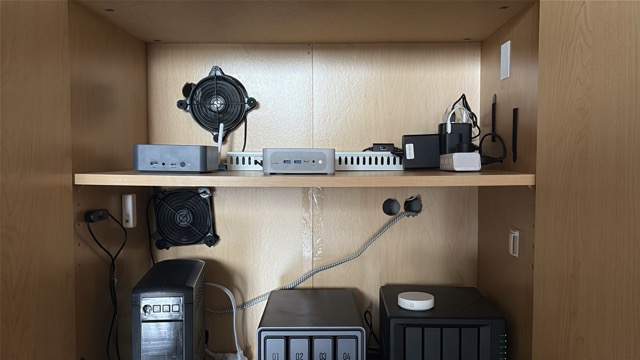
Stick to a micro or mini PC. They're quiet, small, easy to tuck into a closet. They don't run as hot, so cooling is rarely an issue, though if you're boxing it into a cabinet or an enclosed space, a cheap USB fan for airflow doesn't hurt. That's what I do for my two servers and my two NAS units that I run, and it works fine.
What it actually costs
We're almost at the end of 2026, and I'd say these used business PCs start around $250 to $400 CAD right now. It used to be you could get one for between $100 and $300. My last micro PC cost me about $250, and that was with a RAM and SSD upgrade included.
Prices are definitely not what they used to be. I'm speaking in terms of Canadian dollars, so if you're in the US or elsewhere in the world, expect to pay between thirty and forty percent less.
That covers hardware
I'm leaving software for its own post, but there are several good free home lab operating systems out there. If you're new to this, start with whichever one focuses on ease of use rather than features.
Hope this was useful.