I've been running home labs for the past ten years. If I was starting over again in 2026, I would not use Proxmox or set up a NAS. Here's why.
Start with the operating system, not the one everyone tells you to use
Proxmox is a genuinely sophisticated hypervisor, and that's exactly the problem when you're just getting started. I think of it like the old DOS-versus-Windows comparison. If you know what you're looking for and where the settings live, Proxmox is great. If you don't it can becomes a disabler instead of an enabler. Not everyone starts a homelab because they want to learn networking. If that's you, Proxmox isn't the right place to begin.
I'd start with something more user-friendly instead like ZimaOS or FygoOS. I've been using ZimaOS for years now, back before it was even ZimaOS, when it was still CasaOS. I've watched it grow up, and I still think it's the best first operating system for anyone getting started into self-hosting. It's easy to install, easy to set up, and it has exactly what you need to get started.
That said, once you're past the beginner stage, I stop recommending ZimaOS as your main OS. You can still run it in a VM or for a specific use case, but as your primary system, that's when Proxmox earns its keep. That the OS side of things.
The hardware
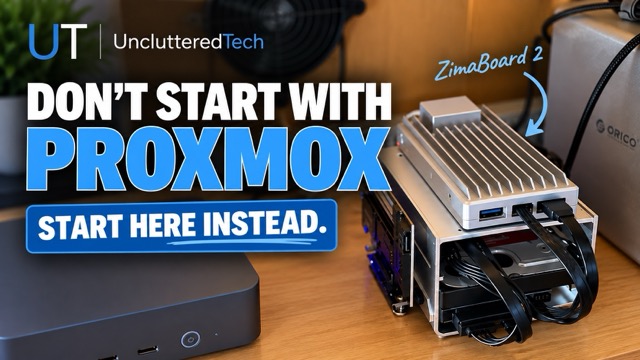
Quick disclosure: IceWhale sent me a ZimaBoard 2 to review. While they did review the content for factual accuracy, all opinions are my own. They've provided the Zimaboard 2 for free, so thanks to them for the hardware. The unit they sent is the ZimaBoard 2 832: Intel N150, 8GB DDR5, 32GB onboard eMMC (about 20GB usable). Two SATA 3 ports, two 2.5G Ethernet ports, two USB 3.1, one PCIe 3.0, and a mini-DisplayPort that'll drive a 4K 60Hz monitor. It runs off a 12V 5A DC supply that also powers two SATA drives, so you're not separately powering your hard drives — a nice touch. Idle TDP is around 10 watts.
What makes it stand out for me is that ZimaOS comes preinstalled. No ISO downloads, No USB key formatting, no separate install like you'd do with Proxmox or any Linux distro. Plug it in and away you go.
This isn't the box for heavy local AI models or video editing. It was never meant to be. But paired with ZimaOS, it's a genuinely great first step into home-labbing.
I've got a discount code below for $30 off if you want to grab one. I'm an affiliate, so I'll earn a small commission, but that's not why I'm recommending it. I just think it's a solid way to get started.
Where the ZimaBoard keeps being useful after you're not a beginner anymore.
A few ways I actually use mine:
I'll use it when I travel or as an emergency server. Pairing it with a GL.iNet travel router and I've got a compact setup that basically lets me work like I'm at home. ZimaOS has a built-in files app. Think a much lighter, much easier Nextcloud. And remote access solution built-in, so your files travel with you without a bigger remote-access headache.
A testing box separate from production. If you're already comfortable with Proxmox, it's nice having somewhere low-stakes to try an app before it goes anywhere near your real setup. Not what I use it for myself but it's something to consider when looking for what it can do.
Primarily I use it to run my essential services. AdGuard Home, Nginx Proxy Manager, Uptime Kuma. The stuff I don't want to lose. I've had to wipe and rebuild my Proxmox server before, entirely my own fault, more than once. If I'd had essentials running on a separate ZimaBoard at the time, I wouldn't have been scrambling to get basic services back online while also rebuilding everything else.
Another good use case is as a Off-site backup. Set it up at home, then drop it at a friends or family member's place. ZimaOS's built-in remote access makes this easy. My brother's just getting into self-hosting, and this is exactly the kind of low-effort off-site backup I'd point him toward.
For storage; skip the NAS for now
Keep it simple: an external drive, or an internal drive in an external enclosure. Don't start with RAID. ZimaOS recognizes new drives the moment you plug them in, so setup is fast and easy.
Before touching any hardware or software, ask what problem you're actually solving. Cloud-free backup? Better ad blocking? Fewer subscriptions? Pick one to start, that decides your first app. Then build the simplest possible thing: one box, one easy OS, one app you'll actually use. Only upgrade when you hit a real bottleneck, not before.
When to actually move to Proxmox?
Eventually you'll want VMs with stronger hardware access, snapshots, ZFS, or setups where one service failing can't be allowed to take others down. That's Proxmox's territory.
On a container-based system like ZimaOS, a badly behaved app can sometimes affect its neighbours. Which is not ZimaOS's fault, it's just how containers share a host. When you're still new, that's not always an easy fix, and sometimes the honest answer is wipe it and start over.
Bottom line
If I were starting as a beginner today: I'd go for one inexpensive box; a ZimaBoard, mini PC, old laptop, whatever. Set it up with an easy OS, and one real problem solved. Move to Proxmox when you actually hit a wall, not because you want to get ahead of where you are.
Still not sure how to getting or want a free guide to help you along click here.
Rather see this in Video format Click Here for the YouTube video.
Here is the link and Promo code for $30 off the purchase of a Zimaboard 2.
Link: Zimaboard 2
Promo Code = UnclutteredTech _832